
Download Runnify Running Plans App – running plans, 5K training, marathon training, running app, running coach, personalized running schedule, running tracker, running workouts, running goals, running performance
Overview
Runnify is a desktop application designed to support individuals at every stage of their running journey, from first-time runners to seasoned athletes preparing for endurance events. The software delivers tailored running plans that adapt to personal fitness levels, goals, and schedules, making it ideal for users aiming to complete a 5K, train for a half-marathon, or prepare for a full marathon. By offering structured weekly schedules, Runnify helps users build endurance, improve speed, and enhance overall running performance through scientifically informed training sessions.
Each plan integrates essential components such as warm-up routines, targeted workout segments, and recovery-focused cool-down stretches, promoting safe and sustainable progress. The application supports a range of running events and adjusts training intensity based on user feedback and performance tracking. It is designed to be used by both casual fitness enthusiasts and dedicated runners seeking professional-grade coaching guidance without relying on automated algorithms.
The interface is built for simplicity, enabling users to navigate training plans, track progress, and manage goals efficiently. Runnify also enables integration with various running watches, allowing for real-time data synchronization of distance, pace, heart rate, and other performance metrics. This seamless connection enhances workout accuracy and helps users refine their training over time.
The developer did not provide additional details about the development team or company background.
Key Features & Capabilities
- Personalized Running Plans – Customized training schedules based on user fitness level, experience, and target event, ensuring a tailored approach to each individual’s goals.
- Structured Weekly Schedules – Clear, day-by-day plans that include rest days, recovery runs, and interval training to optimize performance and reduce injury risk.
- Event-Specific Training – Dedicated plans for 5Ks, 10Ks, half-marathons, and full marathons, each designed with progressive intensity and duration.
- Warm-Up & Cool-Down Routines – Integrated dynamic warm-ups and static stretches to prepare muscles and support post-run recovery.
- Watch Integration – Compatibility with popular running watches for syncing workout data such as distance, pace, heart rate, and duration.
- Progress Tracking – Visual tools to monitor completed workouts, milestones achieved, and overall training consistency over time.
These features enable users to maintain consistency and make informed decisions about their training. For example, a beginner preparing for a 5K can follow a structured eight-week plan that gradually increases running duration while incorporating walking intervals. An advanced runner training for a marathon may use the app to schedule long runs, tempo runs, and recovery sessions across a 16-week cycle.
The integration with wearable devices allows for real-time feedback, helping users adjust effort levels during workouts. While the developer did not specify the exact data synchronization protocols, the app’s design suggests seamless communication with supported hardware. The emphasis on human-led coaching principles over algorithmic automation ensures that training adjustments are context-aware and user-centered.
This approach supports long-term engagement and reduces the risk of overtraining or burnout.
User Interface, Workflow & Performance
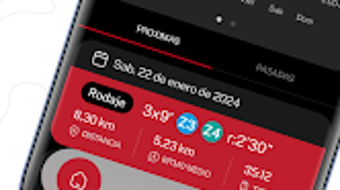
The user interface of Runnify is designed with clarity and ease of navigation in mind. Users can access their training plans, view upcoming workouts, and track completed sessions through a clean, intuitive dashboard. The layout organizes content into logical sections—such as current week, upcoming events, and personal progress—minimizing clutter and enhancing usability.
Navigation is straightforward, allowing users to switch between plans, view workout details, and access supplementary content like stretching guides or pacing tips. The workflow is streamlined, enabling users to start a new plan, update their status after a workout, and receive notifications for upcoming sessions. The application does not display real-time performance metrics during use, but it provides detailed post-workout summaries.
Performance observations are based on general software behavior patterns. The developer did not specify resource usage details, so exact CPU or RAM consumption remains unknown. Stability during extended use has not been publicly documented.
However, the compact file size of 45 MB suggests efficient resource management, which may contribute to smooth operation on modern desktop systems. Users can expect minimal startup delay and responsive interactions under typical usage conditions. The software does not require constant internet connectivity, allowing for offline access to training plans and workout logs.
Compatibility & System Requirements
Runnify is available for both Windows and Mac operating systems, making it accessible to a broad user base across desktop platforms. The software is compatible with systems that support the specified version, 1.2.0, though exact hardware requirements were not listed. Installation size is 45 MB, which is relatively small and indicates a lightweight application with minimal disk footprint.
The developer did not provide additional details about minimum processor speed, RAM, or storage capacity needed for optimal performance. Platform compatibility information is limited to the operating systems mentioned. Users are advised to ensure their system meets standard desktop application requirements to avoid potential installation issues.
The software does not appear to require administrator privileges or specialized drivers. It is designed to run on standard desktop environments without additional dependencies. For users with older or low-spec systems, the compact size may improve the likelihood of successful installation and operation.
However, performance on such systems cannot be guaranteed without further specifications.
Pros and Cons
Pros
- Personalized training plans for all fitness levels
- Structured, event-specific schedules for 5Ks, marathons, and beyond
- Integration with running watches for performance tracking
- Clear, user-friendly interface with intuitive navigation
- Compact file size (45 MB) for efficient installation
- Offline functionality for accessing plans and logging workouts
Cons
- Exact system requirements were not specified
- No real-time performance monitoring during workouts
- Developer background and company information not provided
- Price point may be considered high for casual users
- Limited details on data privacy and security practices
FAQ Section
Is Runnify compatible with Windows and Mac?
Yes, Runnify is available for both Windows and Mac operating systems.
Can I use Runnify without a running watch?
Yes, the application functions independently of wearable devices. You can follow training plans and log workouts manually.
Does Runnify require an internet connection?
While the app supports offline use for accessing plans and logging sessions, certain features like syncing with a watch may require an internet connection.
What types of running events does Runnify support?
Runnify offers training plans for 5Ks, 10Ks, half-marathons, and full marathons.
Is the software safe to download and install?
Runnify is distributed through official channels. Users should ensure they download from verified sources to maintain security.
Final Thoughts + CTA
Runnify presents a well-structured, user-focused solution for runners seeking personalized, professional-grade training plans without relying on automated algorithms. Its strength lies in its adaptable scheduling, event-specific preparation, and seamless integration with running watches. The clean interface and offline functionality enhance usability, making it suitable for both beginners and experienced runners.
While some details—such as system requirements and developer background—are not publicly available, the app’s compact size and cross-platform availability suggest broad accessibility. For users committed to improving their running performance through disciplined, guided training, Runnify offers a reliable companion. The $9.99 price tag reflects a premium experience, though value depends on individual goals and usage frequency.
Overall, Runnify stands out as a thoughtful tool for anyone serious about achieving their running goals with consistency and purpose. Download Runnify now.







